

This page defines how an integrator can reproduce Waycore’s native bank connection onboarding flow inside their own product using the public Waycore API.Documentation Index
Fetch the complete documentation index at: https://docs.waycore.com/llms.txt
Use this file to discover all available pages before exploring further.
Visual reference
Use the screenshots below as visual targets for the host-side implementation. They capture the three main UI states: connection details, delegated user creation, and finish setup.- Connection details
- Delegated user
- Finish setup
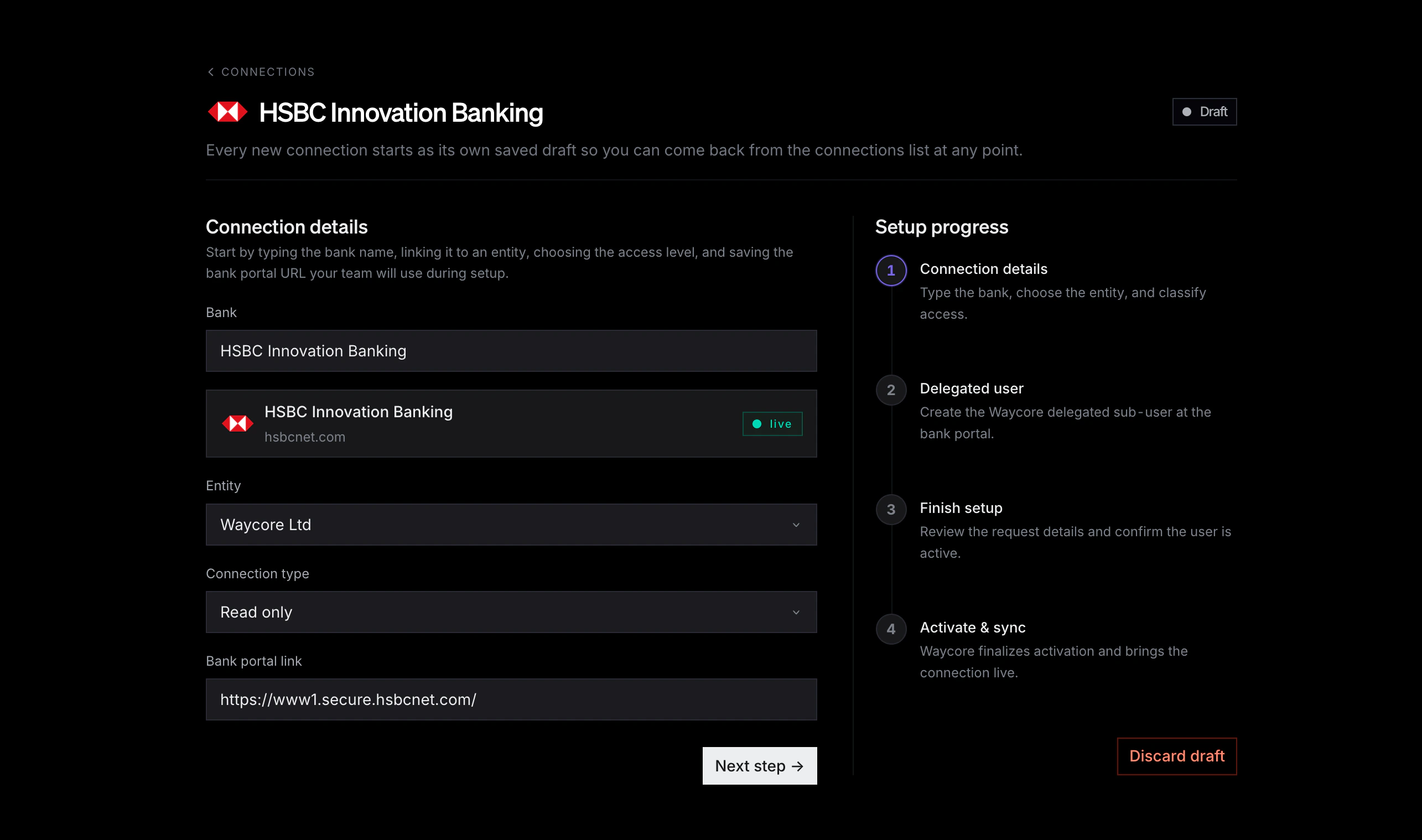
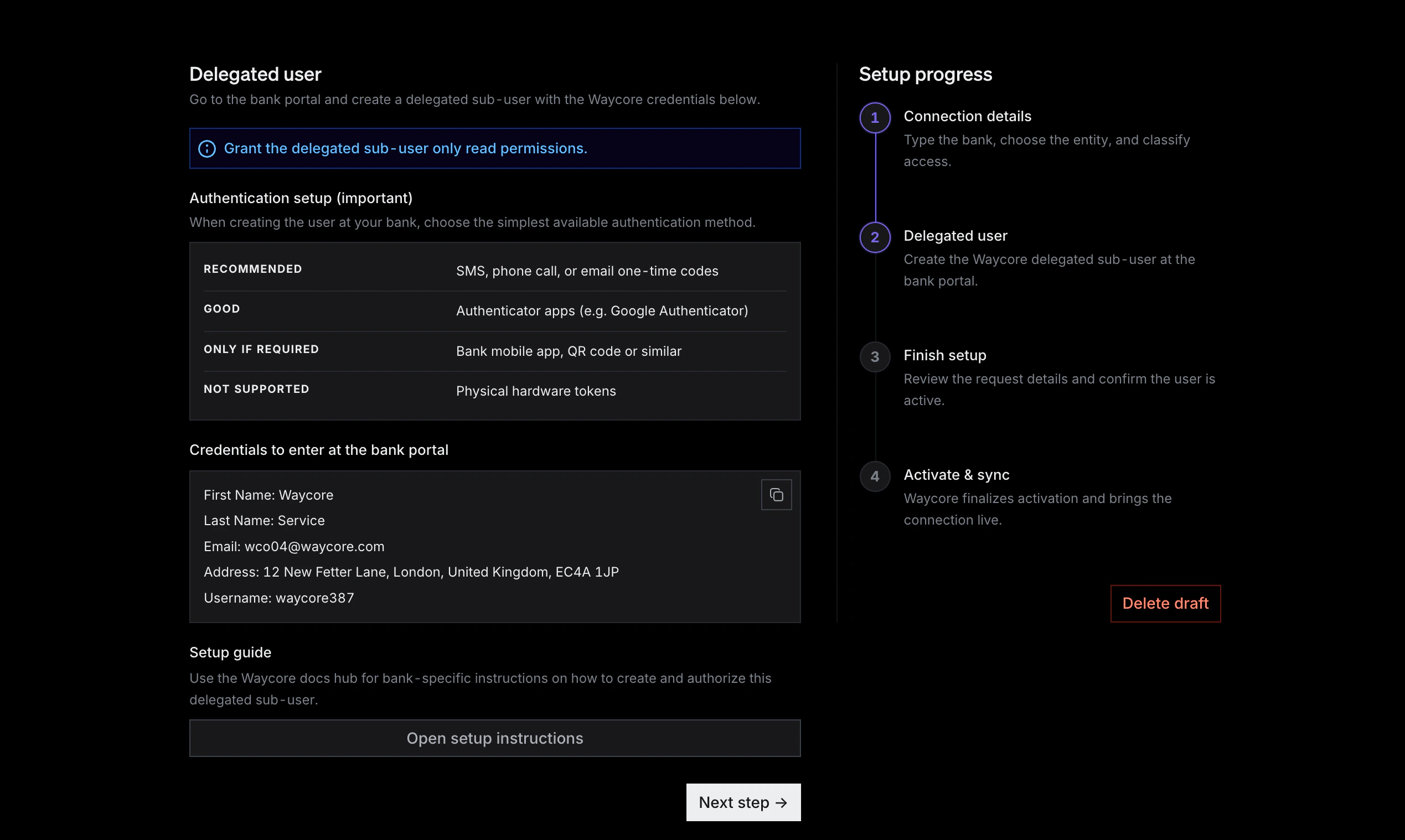
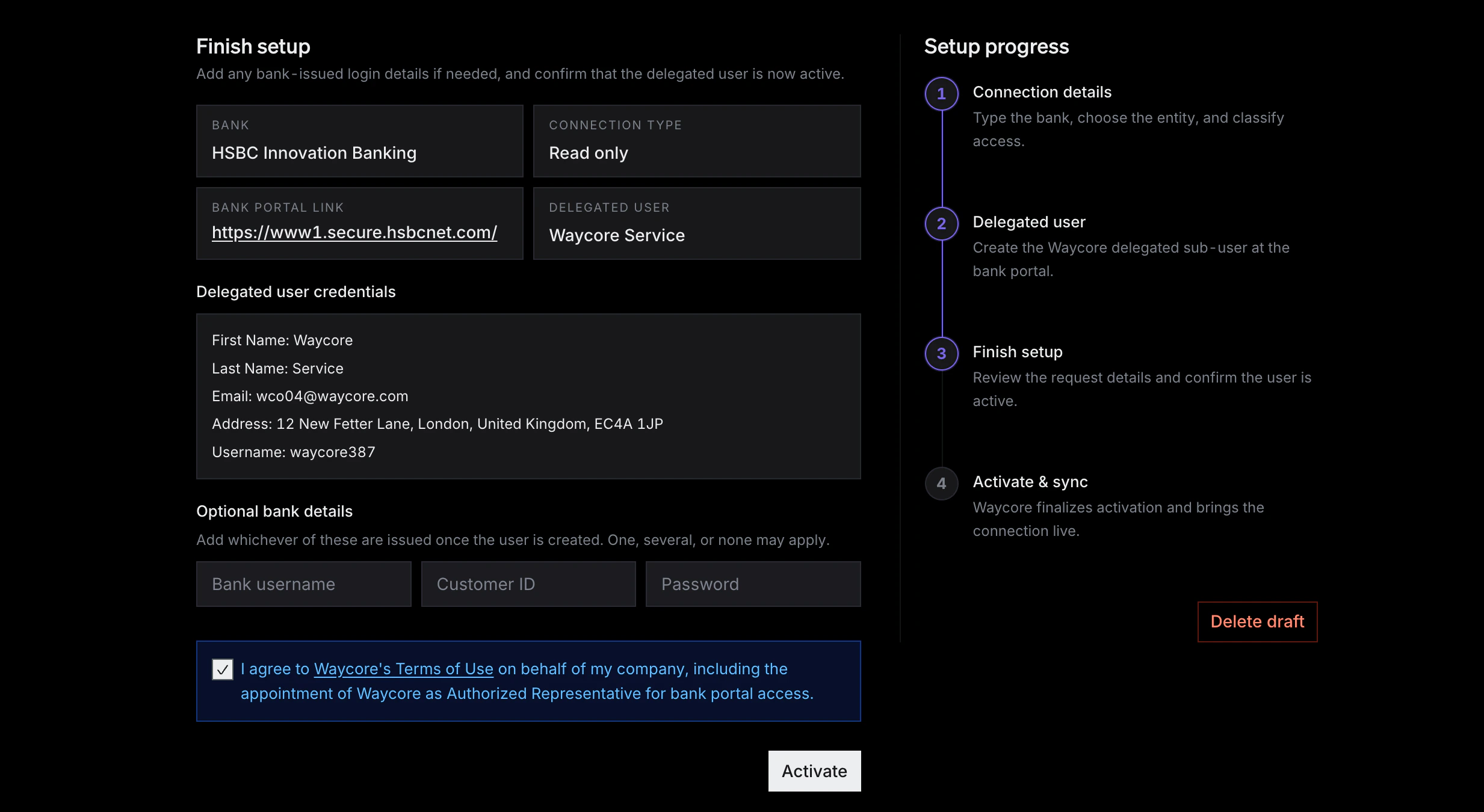
Architecture
Host frontend
Renders the native onboarding UI, stores local draft state, and calls the
host backend. It must never call Waycore directly with an API key.
Host backend
Stores the Waycore API key server-side, validates the signed-in host user,
and proxies only the Waycore actions that user is allowed to perform.
Waycore public API
Owns entities, institutions, connection setup state, delegated-user
instructions, activation, sync, accounts, transactions, balances, and
webhooks.
Waycore docs
Provides bank-specific delegated-user setup instructions. Use exact guide
URLs supplied by Waycore, or fall back to the general setup page.
End-customer journey
Connections list
The user sees existing live and in-progress connections and can start a new
connection or resume local draft progress.
Connection details
The user searches for a supported institution or enters an unsupported bank
portal URL. The host backend uses the Waycore entity already mapped to that
signed-in customer.
Delegated user
The host product renders the
setup.instructions returned by Waycore and
sends the user to Waycore’s delegated-user setup instructions.Finish setup
The user optionally enters bank-issued login details, confirms the
delegated user is active, and accepts the required Waycore terms.
Required scopes
For the full embedded onboarding flow, the API key must have:| Scope | Used for |
|---|---|
entities:read | Looking up or validating the Waycore entity mapped to the signed-in customer. |
entities:write | Creating the Waycore entity ahead of the connection flow, or lazily in the background before the first connection is created. |
connections:read | Searching institutions, listing connections, and polling setup state. |
connections:write | Creating connections, submitting credentials, completing setup, deleting connections, and optionally triggering sync. |
accounts:read | Reading accounts and balances after activation. |
transactions:read | Reading and syncing transactions after activation. |
Host screens
These screens are suggestions for the host product UI. They are not Waycore API paths, and the exact route names are up to the integrator.| Screen | Purpose |
|---|---|
| Connections list | List existing and in-progress connections. |
| New connection wizard | Start a new local draft. |
| Draft resume | Resume local progress before Waycore has a connection. |
| Setup resume | Resume a setup-stage Waycore connection. |
| Connection detail | Show a connection after activation or terminal states. |
UI-to-API mapping
Client products may use different labels for the same onboarding moments. Treat the labels below as generic interaction patterns, not required copy.| UI moment | Host backend behavior | Waycore API behavior |
|---|---|---|
| Customer opens a bank connection flow | Identify the signed-in customer and resolve the mapped Waycore entity. | No call is required if the entity mapping already exists. |
| Customer searches for or selects a bank | Query supported institutions, or keep the customer-entered portal URL for an unsupported bank. | GET /v1/institutions when searching supported institutions. |
| Customer starts setup, requests credentials, or continues from bank selection | Create or return the connection for the mapped entity. | POST /v1/connections with entityId plus institutionId or portalUrl. |
| UI displays delegated-user name, email, username, phone, or address | Render the setup instructions from the connection response. | Read connection.setup.instructions; do not call a separate provisioning endpoint. |
| Customer follows bank-portal setup instructions | Wait while the customer acts in the bank portal. | No Waycore API call is required during this step. |
| Customer enters optional bank-issued fields | Submit only populated optional fields. | PUT /v1/connections/{connectionId}/credentials when at least one field is populated. |
| Customer confirms the delegated user is active or clicks activate/finish | Mark setup complete. | PUT /v1/connections/{connectionId}/setupCompletion. |
| UI shows confirming, activating, or waiting state | Poll or consume webhook updates. | GET /v1/connections/{connectionId} or connection.status_changed. |
| UI shows connected state | Treat the connection as usable only once it is ready and active. | Require kind="ready" and status="active". |
| Customer abandons or resets before a Waycore connection exists | Clear local draft state only. | No Waycore API call is required. |
| Customer requests removal after a Waycore connection exists | Require explicit confirmation before deleting the connection. | DELETE /v1/connections/{connectionId} only for intentional removal. |
Draft and resume model
The host product can keep local draft progress before a Waycore connection exists. OncePOST /v1/connections succeeds, use the returned id as the
resume key. From that point onward, the connection is a Waycore resource, not
just local UI state.
- Scope local draft storage by the host tenant or organization.
- Expire abandoned local drafts after a reasonable period, such as 30 days.
- Store only non-secret UI progress in local storage.
- Do not store bank passwords or Waycore API keys in local storage.
- Do not let the browser choose a Waycore
entityId; resolve it on the host backend from the signed-in customer. - Before
POST /v1/connections, a cancel or reset action should only clear local draft state. - After
POST /v1/connections, a cancel action should usually leave the setup connection resumable. - Only call
DELETE /v1/connections/{connectionId}when the customer intentionally wants to remove the Waycore connection.
Public API sequence
1. Resolve the entity server-side
Every public connection must belong to anentityId, but the end customer
should not select, create, or even need to understand Waycore entities. The host
integration must maintain a 1:1 mapping between its customer or company record
and the corresponding Waycore entity.
Before a customer can create a connection, the host backend must already know
which Waycore entityId belongs to that signed-in customer. Create that entity
ahead of time during customer onboarding, or create it lazily in the background
when the customer first opens the bank connection flow.
- Store the mapping in the host system, for example
hostCustomerId -> waycoreEntityId. - Use
externalEntityIdto make the Waycore entity traceable to the host customer record. - Do not render an entity selector in the embedded onboarding UI.
- Do not accept an arbitrary
entityIdfrom the browser as the owner of the connection. - If the backend cannot resolve the mapped entity, stop the flow and fix the mapping before calling
POST /v1/connections.
2. Search supported institutions
Use the public institution catalog for supported banks.- Preserve the user’s free text until they explicitly select a suggestion.
- Never auto-select a fuzzy match.
- Show the institution
nameand portal domain. - If a supported institution is selected, keep its
institutionId. - If no supported institution fits, collect a bank name for host UI context and a valid HTTPS
portalUrl.
3. Create or return the connection
Supported institution:- Use the
entityIdmapped to the signed-in customer by the host backend. - Use
institutionIdwhen the selected bank exists in/v1/institutions. - Use
portalUrlalone when the bank is not yet supported. - Optionally send
portalUrlwithinstitutionIdwhen the supported institution has multiple login portals. - Do not send the host-only
requestedInstitutionNameto Waycore. - Do not send an
entityIdchosen by the browser or end customer. - A duplicate create may return an existing connection with
200 OK; a new one returns201 Created.
POST /v1/connections returns a ConnectionResource directly.
kind="setup", render setup instructions immediately.
null or not yet available.
If the response is kind="ready", the connection is already active enough for
data access.
4. Render delegated-user instructions
Useconnection.setup.instructions as the source of truth.
Show these fields when present:
- First name
- Last name
- Address
- Username
- Phone number
Grant the delegated user read-only permissions unless Waycore has explicitly told you otherwise.Use SMS, phone call, or email one-time codes where the bank supports them.Authenticator apps can work when required by the bank.Physical hardware tokens are not supported for this onboarding flow.
- Use an exact Waycore bank setup guide URL only if Waycore has supplied it to your integration.
- Otherwise link to
https://docs.waycore.com/user-setup. - Do not invent bank-specific setup steps or derive guide slugs from institution names.
5. Submit optional credentials
Some banks issue or require details after the delegated user has been created. If the customer provides any of them, submit only the populated fields.- All fields are optional.
- Skip this call if all fields are blank.
- The password is accepted but never echoed back.
- Do not persist password values in browser storage.
6. Mark setup complete
Call setup completion after the customer confirms the delegated user is active in the bank portal.7. Poll until ready
Poll the connection, or listen forconnection.status_changed webhooks.
- Poll every 5 seconds while the user is waiting on the activation screen.
- Stop polling when
kind="ready"andstatus="active". - Show a recoverable error state for
reauthRequired,errored, orinvalidConfig. - Show a terminal or support state for
pausedorrevoked. - Prefer webhooks for production background updates when the host product is ready.
8. Read data or optionally sync
Once the connection is ready, read accounts, balances, and transactions through their resource endpoints.- Returns
202 Acceptedwhen queued. - Returns
409 Conflictif the connection is still in setup or a sync is already in progress. - Returns
429 Too Many Requestsif the connection is in its 45-minute sync cooldown. - Honor
Retry-Afterwhen present.
9. Delete only when intentional
DELETE /v1/connections/{connectionId} is a hard delete of the public
connection and its linked public data, including accounts and transactions. Do
not use it as a casual “discard local draft” operation unless the user clearly
intends to remove the Waycore connection.
Wizard step contract
Connection details
Primary goalCollect the bank input required to create a connection. The host backend
supplies the mapped
entityId; the customer only provides or selects the
institution/portal details.Fields- Bank search or unsupported bank name
- Bank portal URL
- No local draft exists
- The host backend cannot resolve the mapped Waycore entity for the signed-in customer
- No institution is selected and no unsupported bank portal URL is provided
- The bank portal URL is not HTTPS
- A matching supported institution exists but the user has not explicitly selected it
- Resolve or create the customer’s mapped Waycore entity on the host backend.
- Create or return a connection with
POST /v1/connections. - Store the returned
connection.idin local draft state. - Route to the delegated-user step.
Delegated user
Primary goalTell the customer how to create the Waycore delegated user at the bank.Required sections
- Access instruction callout
- Authentication setup guidance
- Delegated-user credentials block from
connection.setup.instructions - Setup guide link
- Next action
connection.setup.instructions.Setup guide sourceLink to an exact Waycore guide URL if provided out of band. Otherwise link
to https://docs.waycore.com/user-setup.Finish setup
Primary goalCapture optional bank-issued details and confirm the delegated user is active.Optional fields
- Bank username
- Customer ID
- Password
https://docs.waycore.com/legal/terms-of-use.Successful completion sequence- If any optional credential field has a value, call
PUT /v1/connections/{id}/credentials. - Call
PUT /v1/connections/{id}/setupCompletion. - Route to the activation step.
Activation
Primary goalCommunicate that Waycore is finalizing activation and the customer can wait
safely.Copy
Waycore is finalizing activation and will start the first sync automatically.PollingPoll GET /v1/connections/{connectionId} every 5 seconds while the user is
on this step, or update from webhooks if your backend already receives them.RedirectWhen the connection becomes kind="ready" and status="active", clear the
local draft and route to the host connection detail page.Step visibility state machine
This state machine uses only public API fields.Public status display rules
| Public field | UI label | Typical action |
|---|---|---|
kind="setup", status="draft" | Setup in progress | Show delegated-user or finish setup step. |
kind="setup", status="pendingActivation" | Activating | Show activation step and poll. |
kind="ready", status="active" | Connected | Clear draft and show connection detail. |
status="reauthRequired" | Reauthentication required | Route to support or reauth handling. |
status="errored" | Error | Show recoverable error and contact/support path. |
status="invalidConfig" | Needs correction | Ask user to review portal URL or contact support. |
status="paused" | Paused | Show maintenance or support state. |
status="revoked" | Revoked | Show disconnected state and stop polling. |
syncStatus only on kind="ready" connections:
syncStatus | UI label |
|---|---|
idle | Not currently syncing |
syncing | Syncing now |
Bank portal URL rules
Do not strip query strings or deep paths generically. Send the exact HTTPS portal URL the user entered unless Waycore has explicitly provided a normalized or canonical portal URL through/v1/institutions.
Safe rules:
- For supported institutions, use
canonicalPortalUrlas the default display value. - Offer
additionalPortalUrlswhen present. - For unsupported banks, require the customer to provide a valid HTTPS portal URL.
- Do not infer login URLs from bank names.
- Do not convert arbitrary bank homepages into login portals.
Error handling
| Status | Meaning | Host behavior |
|---|---|---|
400 | Invalid request, entity, institution, portal URL, cursor, or credential payload. | Show a user-safe validation message, and keep the raw API error for developer logs or support. |
401 | Missing or invalid API key. | Fix server-side configuration. Do not ask the browser user for the API key. |
403 | API key lacks required scope. | Request or configure the missing scope. |
404 | Resource not found or not visible in this API/environment. | Treat as unavailable to this API key. |
409 | State conflict, duplicate/cross-environment conflict, setup-stage sync, or sync already running. | Show a non-destructive retry or support path. |
429 | Rate limited or connection sync cooldown. | Honor Retry-After before retrying. |
LLM implementation constraints
If an LLM is generating the host-side product from this document, it must:- Never put a Waycore API key in frontend code.
- Use the host backend as the only caller of Waycore public APIs.
- Use
/v1API paths only. - Use API key auth only:
Authorization: Bearer <key>. - Never show an entity selector to the end customer.
- Resolve the Waycore entity on the host backend from the signed-in customer.
- Create the Waycore entity ahead of time or lazily in the background before creating the first connection.
- Use
dataandpagination.nextCursorfor list responses. - Use
connection.setup.instructionsfor delegated-user details. - Use
institutionIdfor supported institutions andportalUrlfor unsupported institutions. - Never invent bank-specific instructions or setup guide URLs.
- Treat manual sync as optional because activation starts the initial sync automatically.
- Respect sync cooldowns and
Retry-After. - Treat
DELETE /v1/connections/{id}as destructive. - Map UI labels by lifecycle stage, not by wording.
- Treat a credentials/request/start button as connection creation when no Waycore connection exists yet.
- Treat an activate/finish/done button as setup completion once the delegated user exists.
- Treat cancel/reset/discard as local cleanup before connection creation and explicit deletion only after confirmation.
- Avoid promising public transfer execution or transaction preparation unless a separate released API supports it.
Example host-side orchestration
Frontend code calls the host backend:Success criteria
A customer using the host product should feel like they are completing
Waycore bank onboarding natively, while the implementation remains safely
server-side, uses only
/v1 public APIs, and relies on Waycore for
delegated-user details, setup state, activation, and sync lifecycle.